
A terminal for multi-agent work
Keep a window full of agents on track
maiTerm runs Claude Code, Codex and your shells side by side — then shares a real kanban board with them, supervises them against rules you write, and brings every tab back exactly as it was. No LLM inside, no chat sidebar.
- Free — every feature, no paid tier
- No account — nothing to sign up for
- Source published
macOS, Windows and Linux.

Workstream Loom
Every agent in the window. None of their terminals.
Ten agents means ten terminals to visit: scroll back to find what one asked, answer it,
move on to the next, and miss the one that stopped while you were reading. Press
Cmd+Shift+J and the Loom puts all of them in one place, across every
workspace in the window.
Focus is where you talk to them. The agents that need you come first; open one and its conversation reads like a chat — tool runs folded away, the work it is doing beside it — with whatever it is stopped at answerable right there: a permission prompt by its real options, a question, a task waiting on your decision. Then reply — and, to a Claude Code agent, paste a screenshot in or switch its model and effort — without ever finding its tab.
Focus
A condensed chat per agent, a composer, and its prompts answered in place. The header carries its state, its context and anything Overlord is running at it, and what Overlord or maiTerm typed for you is folded apart from what you said.
Weave
Agents strung to the tasks they are working, by workstream: who is on what, what is waiting and on what, and what has quietly gone still.
Decisions
Every question an agent has stopped on, and every watch script waiting for your OK, oldest first. Pick an option or answer in your own words, and the answer goes back to the agent that asked.
Agent accounts
Claude Code has one login slot. Your week does not.
Two clients, or a personal subscription and your employer's — and one place to be
signed in. Moving between them means /logout, /login, the
browser, again; and it takes every tab with it, because that login is global to the
machine. The agent itself offers no way to switch.
maiTerm holds as many logins as you need and starts each new tab under whichever one you have made active. Pick an account, open a tab, pick another, open the next — and the client's account is working in one while your own runs in the tab beside it, at the same time, no signing out, nothing to redo when you switch back.
On this computer it does that without ever holding your credentials. Each account is a separate configuration directory, and the agent signs in to it, refreshes it and signs out of it exactly as it always has. maiTerm never reads, writes or parses a login, and never touches the keychain entry or credentials file it lives in — it owns the folder, never the credential in it.
Nothing else changes
Your hooks, skills, commands, permissions and MCP servers are shared into every account, so a tab running as one behaves exactly like a tab that isn't. It is a different login, not a different setup. Even the memory writes Claude Code asks about wherever its config runs through a link go through without a prompt.
Chosen when a tab starts
Switching decides what new tabs use; the ones already open keep working as whoever they started as. An account is handed to a shell at launch, so nothing can change it underneath a running agent — reload the tab to move it across.
It says who is actually answering
An ANTHROPIC_API_KEY or a cloud-provider variable outranks a
subscription login while still reporting itself as signed in. maiTerm strips those
out of every tab it starts under a managed account, and Verify
reads back the identity that genuinely resolved — not a green light.
Off until you turn it on. macOS and Linux for now, and Claude Code today; the other runtimes are named as not yet available rather than half-wired. SSH tabs can run as the active account too, on the hosts you choose — the one place maiTerm does hold a token, so it is opt-in per account and the trade-off is spelled out before one is made.
How accounts workStart with what you know
It is a terminal first. The rest waits until you want it.
Nothing here asks you to change how you work on day one. Open a project, run a shell, keep moving — and turn on the parts that manage a desk full of agents when you actually have one.
- Day one
A terminal that feels familiar
Tabs, splits, search, themes, a real editor on any file path. Fast, native, and small — Tauri 2 and the system webview, not a bundled browser.
- As you settle in
Your projects become workspaces
Group tabs by project with their own layout and context. Suspend what you are not using. Restart the machine and find all of it exactly where you left it.
- When you are ready
Your agents get a shared desk
One kanban board both sides work, a supervisor watching the whole window, agents that can talk to each other, and ways in from your phone and your team's chat.
Workspace stack
One dev server, however many agents.
Every project has things that must be running before any of it works — a dev server, an API, a database, a queue worker. You start them by hand in four tabs, lose track of which one died, and then an agent starts a fifth copy of the dev server because nothing ever told it the first one was up.
A workspace can just say what its project runs. maiTerm starts each service, watches its exit code, brings it back when it crashes, and shows the set under the workspace with a rollup dot that goes green only once every service meant to start with it has — never because one of them did. Click one and its console opens over your work — a drawer along the bottom, never a dock that steals width from the tab you are typing in. Click away and it is gone.
It knows where, too. A dev server announces its address the moment it comes up, so maiTerm reads it off the output and fills it in — no sockets sniffed, no configuration. Shift-click the row to open it in your browser.
The stack belongs to the workspace, so every agent in it sees the same one.
On a mesh workspace that is sixteen agents and still one dev server: each session is told
what is running and where — web (ready, http://localhost:5173), api (crashed)
— and eleven tools let them read a failing service's log, restart it, and wait for it to
come up before they call it.

It reads the project first
Point it at a directory and it offers what is already declared —
package.json scripts through whichever package manager your lockfile
implies, a Procfile, the services in a compose file, a
justfile or Makefile. Tick what you want.
A service is a real tab
Not a process hidden behind a panel — a terminal, with real scrollback, colour and
a TUI that renders properly. It just has no slot in your tab strip, so no
stray Cmd+W can take your database down with it.
Crashes, within reason
A service that dies comes back on its own, waiting longer each time. After five restarts in ten minutes it stops and says so on the row, rather than thrashing all afternoon against something that is not going to start.
Task board
A real kanban board, shared with your agents
Agents keep private to-do lists. You watch one scroll past in a terminal, and that is the whole relationship — no way to add an item, correct one, or see across a window what is actually in flight.
maiTerm owns that state now. Seven lanes, with workstreams keeping the unrelated jobs inside one project apart. Dependencies that genuinely hold: a prerequisite parked in the backlog still blocks what is waiting on it, and a task an agent retracts pointedly does not satisfy its dependents the way finishing one does. Assign a row to a tab, or leave it unassigned for whoever picks it up.
Every row carries a spec and an append-only log beneath it, where each entry is stamped with who actually wrote it rather than who claims to have.
- Backlog
- To-do
- Active
- Blocked
- Review
- Done
- Dropped
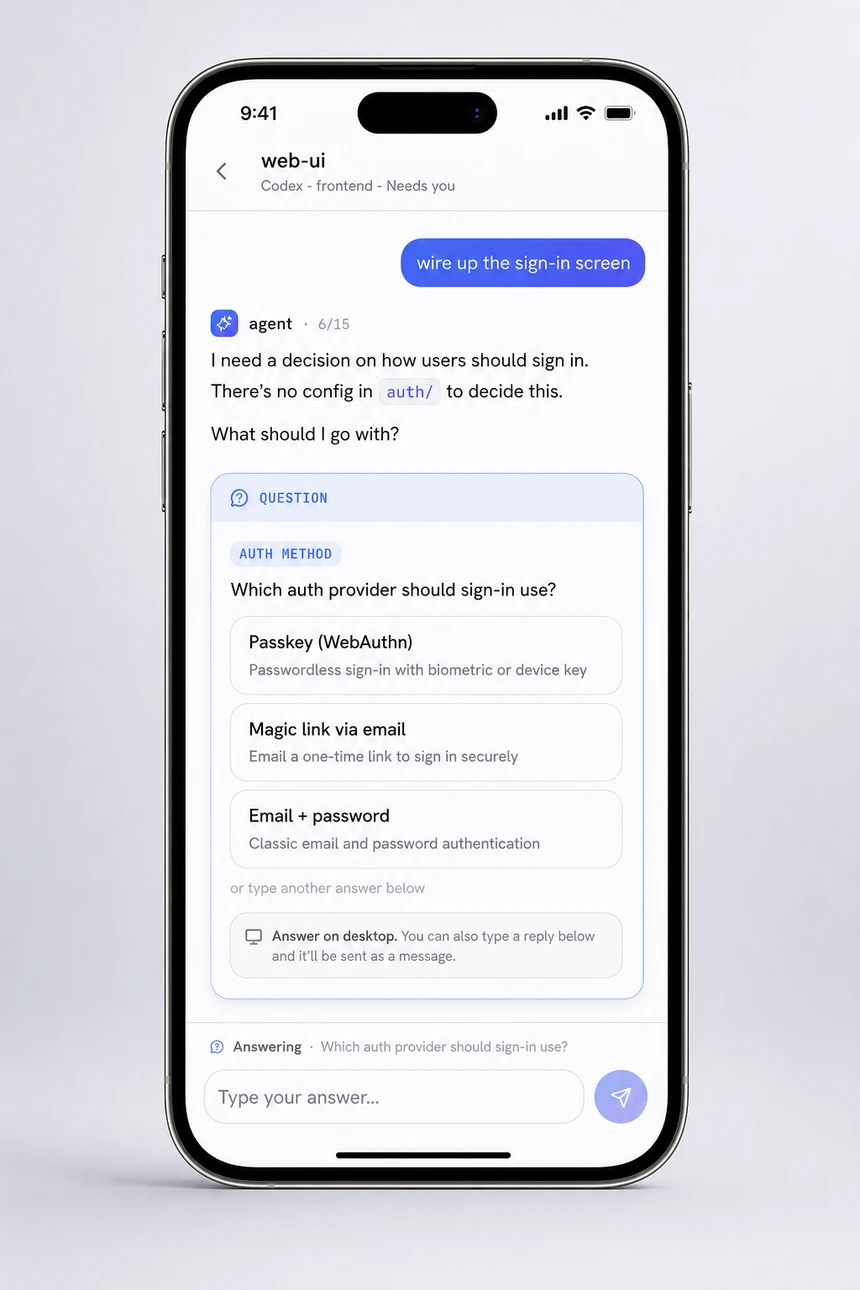
When an agent needs a decision, it asks on the row and stops: the question, the options, why it matters. Answer it on the board, in the Loom or from your phone, and the answer is typed straight back to that agent, which picks up where it left off.
Open it with Cmd+Shift+E: add, retitle, annotate, park, reassign, or hand
a row over with Do it. The agent sees every one of those edits
through the same tools it writes with — and none of the three lets it delete a row.
Work it misread gets retracted to Dropped, which you can reverse; removing
one for good stays yours.

Overlord
A supervisor for a window full of agents
With a dozen agents running, what you lose is not any single answer — it is track. Which tab is about to hit a compaction wall, which has been sitting at a permission prompt for twenty minutes, which one quietly stopped being connected at all.
A rule is a condition and a sequence: when context reaches 55%, tell the agent to
update its docs, then to prepare for compaction, then /compact —
waiting for each step to genuinely land before sending the next.
No model sits in that loop, so it is predictable and costs nothing to
run.
Held for your approval
Overlord types with your authority, so propose mode is on out of the box: every directive waits for you, showing the exact words it would send. Your own keystrokes abort a sequence already in progress.
An operations deck
Loom is where you work with the agents. Triage is one severity-ordered queue of everything wanting a person. Ledger is a verbatim record of every directive sent and what came back.
Rules you actually tune
Conditions fire on semantic state — context, commits, idle time, stale tasks, waiting permission prompts — not on scraped terminal output. Scoped globally or per workspace.
Mesh workspace
A team of specialists, not one giant context
Flip a workspace into a mesh and every agent in it can message any other by role. The frontend agent asks the backend agent for an endpoint's exact shape, the backend loops in infra, and nobody waits for you to play messenger.
It is also a token win. One monolithic agent drags every codebase into a single enormous context and re-reads it turn after turn. A mesh keeps each agent's context small and sharply scoped, and they trade short addressed messages instead of duplicating each other's worlds.
How mesh works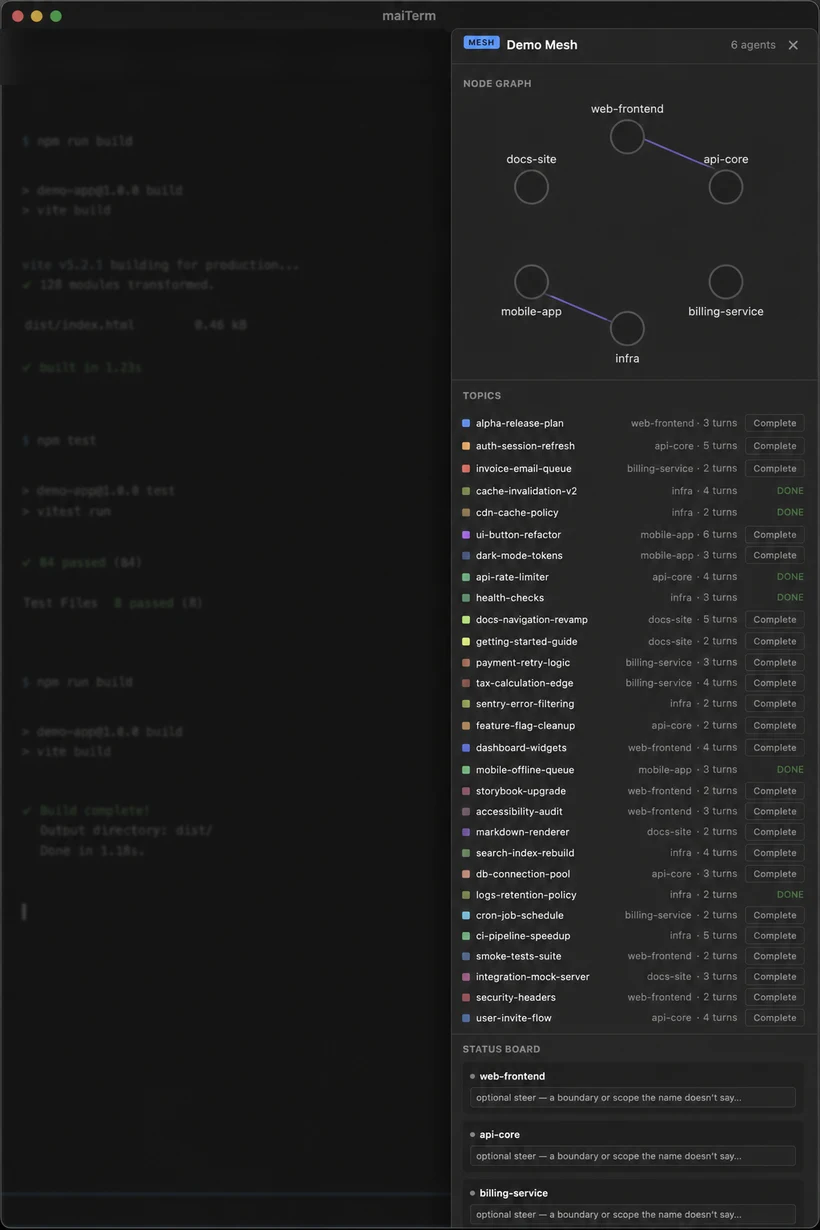
maiLink companion
Your agents, in your pocket. No cloud in the middle.
A phone app that connects directly to maiTerm on your own computer. Watch agents work, answer their questions, approve permissions, and interrupt a runaway turn — from the couch, the garden, anywhere in the house.
A permission card shows the options actually on the agent's screen, not a generic yes or no. A task an agent has stopped on arrives as a question you answer with a tap. Even Claude's folder-trust check — the “Quick safety check” that stops a session before it starts — is a card you can answer from the phone.
It writes, too: work the shared board — move a card between lanes, retitle or reassign one — approve an Overlord proposal, allow a watch script an agent wants run, rename or archive a tab, wake a suspended workspace. Running several Claude accounts? Each chat shows which one it's running as, and you can switch the active one from the phone.
It travels over your LAN only, on an encrypted, authenticated channel. The single exception is a content-free push doorbell. It rings for a permission prompt, a question on one of an agent's tasks or a watch script waiting for you, and wakes the app carrying nothing but a tab name and an event kind — never a transcript. Each phone picks which kinds ring it: keep permission prompts, mute "agent finished".
How maiLink works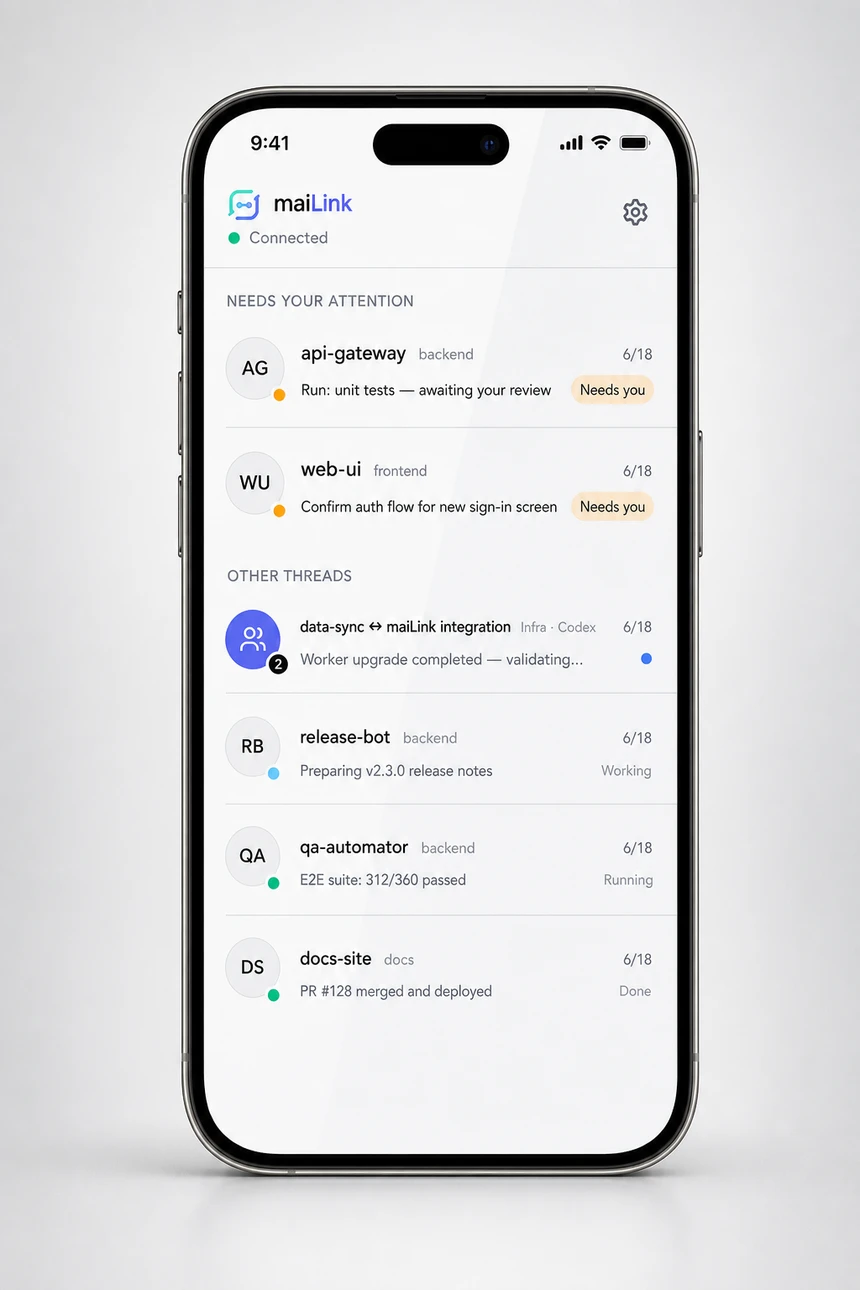
Chat threads
The bug report never has to leave the thread it landed in.
A customer problem shows up in a Mattermost thread. Normally you read it, switch to
your editor, reproduce it, fix it, then come back and write up what you did. Point a
tab at that channel instead: set up a bot account once, and an @mention of
it hands that tab the thread — the conversation so far, plus the screenshots, logs and
documents staged as real files on disk — to work in that tab's repository.
The channel keeps flowing normally. Only messages that @mention the bot are
delivered into the session, so the agent answers deliberate asks rather than reacting to
everything said near it.
It replies before it investigates — its one-line read of what is being asked, and how to reach it again — so a misunderstanding surfaces immediately instead of ten minutes later in the shape of the wrong fix. Then it goes quiet, works, and posts the resolution in two halves: plain language for whoever is talking to the customer, and the root cause below the divider for the devs.
Support can ask, not authorize
Who may summon the bot is enforced in Preferences — an @mention from
anyone else never reaches an agent. Above that, every delivered message arrives
tagged with its sender's tier and a standing rule: reading is free, but changing
code, deploying or touching data goes back to someone you named.
Six threads, and a kill switch
One tab works up to six at once and queues the rest, telling a waiting thread it is at capacity rather than leaving people wondering. The tab's right-click menu ends a binding — every one of them on a busy tab — without the agent's cooperation.
It can start the conversation
A regression it tripped over, a heads-up before a deploy, a question only a person
can settle — the agent opens its own thread in a channel you put on that tab's
list, @mentions whoever should see it, and stays bound for the replies.
Follow-ups
An agent that comes back to it, without you remembering to ask.
“I'll check the deploy in twenty minutes” is a promise no agent can keep. It stops, and the check happens only if you remember it. In maiTerm the agent schedules its own next prompt, into its own tab: at a time, when a service in the workspace comes up or goes down, or when a task on the board is done.
Waiting on something else — CI finishing, a file appearing, an error showing up in a log? The agent writes the check as a short script, and maiTerm runs it on a schedule without waking the agent, so nothing is spent while nothing has changed. The prompt arrives when the check passes, carrying what it found.
The same session, picked up
It lands in the tab the agent is already in — its transcript, your local services, your files — between turns, labelled as its own earlier note. Exited since? maiTerm relaunches it at an empty prompt, then delivers.
Nothing runs you haven't read
A watch script runs only after you allow it, on a card that shows the whole script, where it runs and how often. Answer it in the Loom, on the tab or from your phone; decline it and the agent is told. And it never types over a message you are still writing.
Yours to see and cancel
A clock on the tab says one is pending; click it for the list, each row leading with what it waits for and anything holding it — send one now, remove it, or schedule your own.
Part of Overlord, so it is live while Overlord is on. Claude Code and Codex alike, and it survives maiTerm restarting.
How follow-ups work
Runs the agent CLIs
you already have installed
- Claude Code
- OpenAI Codex
- Local shells
- SSH hosts
- macOS
- Windows
- Linux
The daily work
The rest of it still has to be a good terminal.
Orchestration is worth nothing if the thing you sit in front of all day is annoying.
Restart without losing anything
Reboot the machine and every tab comes back as it was — scrollback, layout, SSH sessions, agent sessions — each resumed agent reconnected to its tab with nothing typed by anyone, and the dev servers you left running started again.
Know what is in every tab
Interpolated names like CustomName %title combine your label with live terminal state. No more guessing across fifteen identical “bash” tabs.
Workspaces per project
Group terminals by project, each with its own pane layout and context. Suspend the inactive ones to free resources; they resume with full state. Move a workspace or a single tab to another window and everything in it keeps running.
Hand a workspace to a teammate
Share a workspace as one file. Whoever opens it gets the same tabs in the same repositories — cloned for them where they don’t have them, services and agents included — and none of your accounts, scrollback or secrets. On their side, every command it would run is listed word for word first, and only the ones they approve ever run.
Bridge two agents
Connect two running sessions — one local, one over SSH, a Claude Code and a Codex — so they ask each other questions directly, in a split pane you can watch.
A composer, not a shell line
A multi-line dock under every terminal. Enter makes newlines, Cmd+Enter sends, drafts survive restarts, and pasted screenshots become attachments — uploaded automatically over SSH.
Built-in editor
Click any file path in terminal output to open it in an editor tab — over SSH too, loaded transparently. 50+ languages, with an inline merge view when a file changes under your unsaved edits.
Deshittify your agent
One Preferences section switches off the parts of a coding agent that serve its vendor: telemetry, error uploads, feedback nags, Remote Control (off by default), and the Co-Authored-By trailer in your history.
A Rust terminal underneath
alacritty_terminal does VTE parsing, buffering and scrollback in the backend, so the frontend only ever paints one screen. Scrollback persists to SQLite, crash-safe.
What it costs
Free. All of it. There is no tier above this one.
Not free-for-four-projects, not free-until-you-need-the-good-part. Overlord, the Loom, mesh, the shared board, follow-ups, chat threads, the phone companion, SSH — every feature on this page is in the build you download, and there is nothing to buy later.
No account
No sign-in, no licence key, no activation limit, no seat count. Download it and it works. It does not know who you are.
Works offline
There is no licence check to phone home to. The only request maiTerm makes on its own behalf is looking for a new version.
The source is published
Read it, build it, change it. Source available rather than OSI open source: the one restriction is that you may not use it to build a competing terminal.
Questions
Frequently asked questions
Is this a VS Code or Electron fork?
No. maiTerm is a Tauri 2 desktop app using the operating system's own webview — WebKit on macOS, WebView2 on Windows, WebKitGTK on Linux. There is no bundled browser and no editor fork. The terminal itself is Rust: alacritty_terminal does the VTE parsing and buffering in the backend.
Does maiTerm see my API keys or proxy my prompts?
No. maiTerm launches the agent CLIs already installed on your machine and they keep using their own accounts, authentication and configuration. Your conversations go from that local CLI to its provider. maiTerm is not a model gateway and never asks you for a provider key.
Can I be signed in to two Claude accounts at once?
Yes, and Claude Code on its own cannot — it has a single login slot, shared by every terminal you open. maiTerm gives each account its own configuration directory and starts each new tab under whichever account you have made active, so a client's account can be working in one tab while your own runs in the next. For those local tabs it never holds the credential: the agent does its own sign-in, refresh and sign-out, and maiTerm owns only the folder. SSH tabs can run as the active account too, on hosts you choose — that needs a long-lived token, which maiTerm keeps in your system keychain, so it is opt-in per account. Off by default, macOS and Linux for now.
Which coding agents does it support?
Claude Code and OpenAI Codex, through one runtime-neutral pipeline — you pick which ones maiTerm wires up in Preferences. Any other CLI still runs in a tab like it would in any terminal; it just does not get the agent-aware features.
Is there an LLM built into the terminal?
No, and that is deliberate. There is no chat sidebar and no model maiTerm calls on your behalf. It manages the agents you run, rather than being another one.
What happens when I restart, or it crashes?
Every tab comes back as it was: scrollback, pane layout, working directories, SSH sessions and agent sessions. Each resumed agent reconnects to its tab on its own, with nothing typed by anyone. Scrollback persists to SQLite in WAL mode, so an unclean exit does not take the buffer with it.
Does it work over SSH?
Yes, and it is a first-class path rather than an afterthought. Agents on a remote host get the same tab identity, task board, notes and MCP tools through a reverse tunnel. Remote files open in the editor transparently, and file paths in output are clickable the same way.
Do my agents get to change things without me?
Only what you allow. Overlord ships in propose mode: every directive is held for your approval showing the exact words it would send, and your own keystrokes abort a sequence in progress. The rule guards are human-only and cannot be edited by an agent. Agents can mark a task done but there is deliberately no delete tool. A script an agent asks maiTerm to run for it later runs only once you have approved that exact script.
Claude Code can already schedule things. Why follow-ups?
Its own schedules either live inside the running Claude process or start a fresh session in the cloud, on a clone of your repo. A maiTerm follow-up is held by maiTerm and delivered back into the same tab — the same session, your local services and files, your SSH hosts — and it survives the agent exiting and maiTerm restarting. It can wait on your workspace, not only the clock: a service coming up, a task finishing, or a check the agent wrote. It works for Codex too, and you can see and cancel every one that is pending.
What does it cost?
Nothing. Every feature is included — there is no paid tier, no licence check and no account.
What licence is it under?
Source available, not OSI open source. The full source is published and you may use, modify, distribute and sublicense it; the one restriction is that you may not use it to build a competing terminal emulator. Building it into something with a substantially different purpose — an IDE, a DevOps platform — is explicitly allowed. The terms are in LICENSE in the repository.
Which platforms does it run on?
macOS (Apple Silicon only — there is no Intel build), Windows 10 and later as a 64-bit installer, and Linux as an AppImage or .deb built against webkit2gtk-4.1 on Ubuntu 24.04.
Does it phone home?
Only the update check, and it is counted. That check reaches a small Cloudflare Worker which records one row per unique user per day — a salted hash of IP and user-agent, where the salt is random, rotates daily and is then discarded, so it cannot be reversed or linked across days. No IP, user-agent, cookie or device ID is stored, and nothing about your projects, tabs, terminal output or agents ever leaves the machine. There is no other analytics, no error uploads and no account. maiTerm also ships a Preferences section that switches off the telemetry and error reporting in the agent CLIs it launches, and it turns Claude Code’s Remote Control off by default, so your sessions are not exposed to claude.ai or the Claude mobile app unless you switch it back on.
How do updates work?
maiTerm checks GitHub Releases automatically and installs an update with one click, showing you the release notes first. You can turn the startup check off in Preferences and update from the menu instead.
Can I get my state onto another machine?
Yes. Export workspaces, tabs, scrollback, notes, triggers and preferences to a single archive — on a schedule if you want, with compression and auto-trim. Importing previews what is inside so you can pick which workspaces to bring in and whether to merge or overwrite.
Give every agent on your desk the same place to work.
Start with a terminal. Turn on the supervisor when the desk gets busy.
Free, source available. macOS, Windows and Linux.